
Speed Controls & Subtitles at AMAU
Updated
Assalamu Alaikum Wa Rahmatullahi Wa Barakatuh.
AMAU Academy provides playback speed controls and subtitles to help you study lessons more comfortably. These tools allow you to slow down difficult sections, review lessons more quickly, and follow the content more closely.
Subtitles
Subtitles allow you to read along while watching a lesson. This can help improve clarity and make it easier to follow detailed explanations.
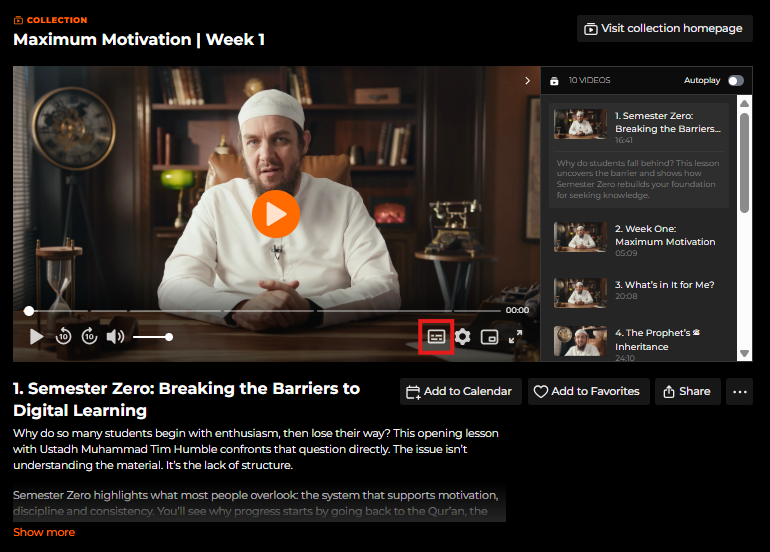
Web Player Click the Subtitles button at the bottom of the video player.
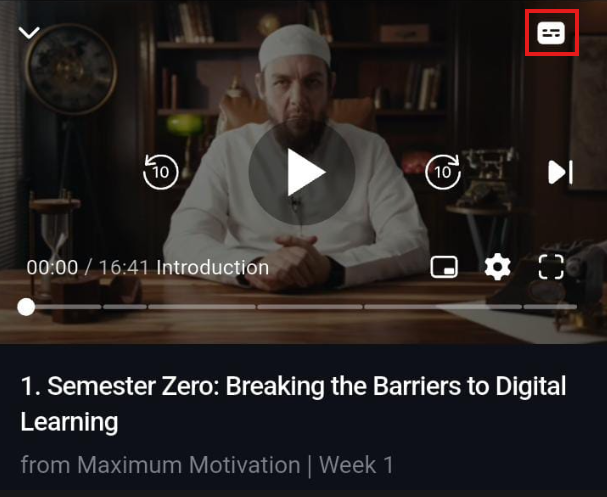
Mobile Apps
Tap the Subtitles icon in the video player.
TV Apps Subtitles can be accessed through the player settings, depending on the device.
Note: Subtitles are not turned on by default and must be enabled manually.
Playback Speed
Playback speed controls allow you to adjust how fast or slow a video plays.
You may wish to:
• Slow down the video when studying complex topics
• Speed up the video when reviewing material
Changing the playback speed does not affect video quality.
Web Playback Settings
1. Open the video you want to watch.
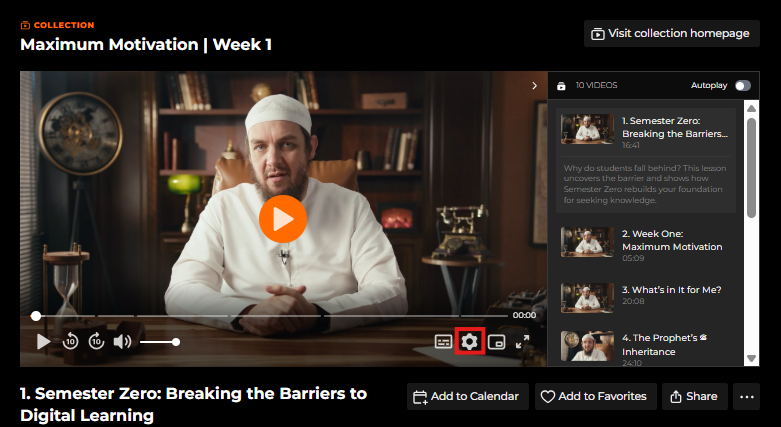
2. Click the gear icon (⚙️) in the player controls.
3. Select Playback Settings.
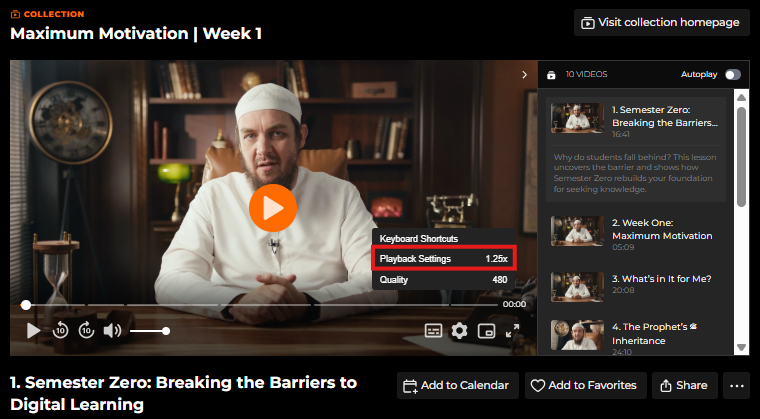
4. Choose your preferred speed. Available speeds include:
• 0.5×
• 0.75×
• 1× (normal)
• 1.25×
• 1.5×
• 2×
Speed options may vary slightly depending on your browser.
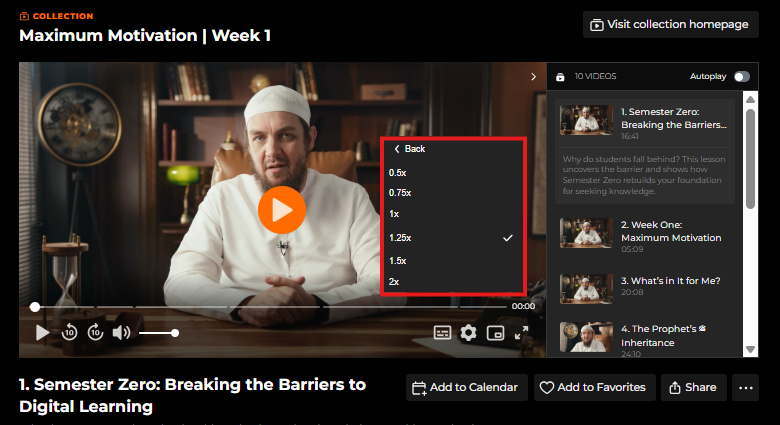
Note: Speed options may look slightly different depending on your browser, but all modern browsers support this feature.
Mobile Apps (iOS and Android)
On iOS and Android apps, your chosen playback speed applies automatically to all videos, saving you the hassle of adjusting it each time.
1. Open the video.
2. Tap the gear icon (⚙️).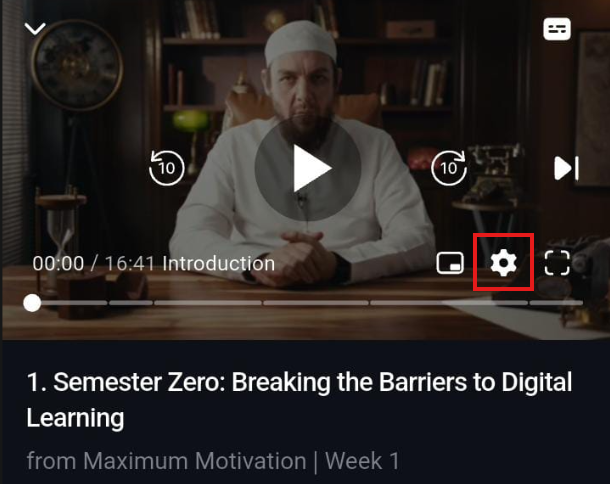
3. Select Playback Rate.
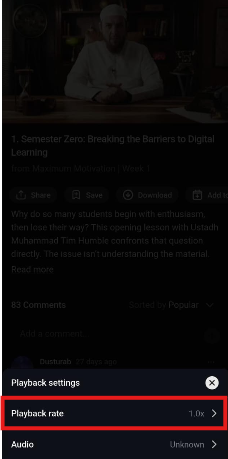
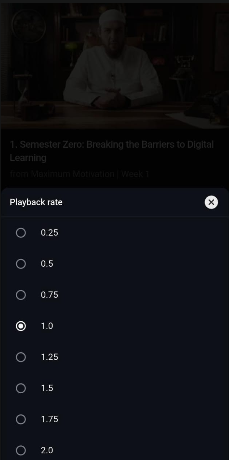
4. Choose your speed. Available speeds include:
-
0.25×
-
0.5×
-
0.75×
-
1×
-
1.25×
-
1.5×
-
2×
Your selected playback speed will apply to future videos as well.
Tip: Update your app regularly to unlock the full range of playback speeds.
Balance speed with understanding. Knowledge is a trust (Amanah), and rushing through lessons without comprehension diminishes its benefit. Slow down when needed, and reflect on what Allah is teaching you through the content.
TV Apps: Learning on the Big Screen
Some students prefer the comfort of a TV screen. On Samsung TV apps, you can adjust playback speed just like on the web and mobile. Other TV platforms may have limited options, so check your settings before watching.
Common Questions
Why can’t I find the playback speed option? Make sure your browser or mobile app is updated, as older versions may not support this feature.
Does changing playback speed affect video quality? No. Speed adjustments only affect playback speed, not video resolution.
Can I set a custom speed? Currently, only the preset speed options are available.
If you are unable to adjust playback speed or subtitles:
• Refresh the page or restart the app • Ensure your app or browser is updated
May Allah place barakah in your studies and make your pursuit of knowledge beneficial.
For any further queries please contact helpdesk@amauacademy.com