
Subtitles Not Displaying or Not Accurate? -- Troubleshooting Guide
Updated
Subtitles help students follow lessons more easily, especially when studying Arabic terms, Qur’anic references, or detailed explanations. If subtitles are not appearing or seem inaccurate, the steps below can help resolve the issue.
Note: Subtitles for most videos are automatically generated. Because of this, they may contain errors, incorrect wording, or other issues. The AMAU team reviews and manually adds subtitles for selected videos, which are generally more accurate.
1. Ensure Subtitles Are Enabled
Subtitles must be turned on in the video player.
• Click the Subtitles (CC) icon in the video player.
• On web browsers, the icon appears at the bottom of the player.
• On mobile apps, tap the video screen to reveal playback controls and subtitle options.
Subtitles in Browsers

Subtitles in the mobile app
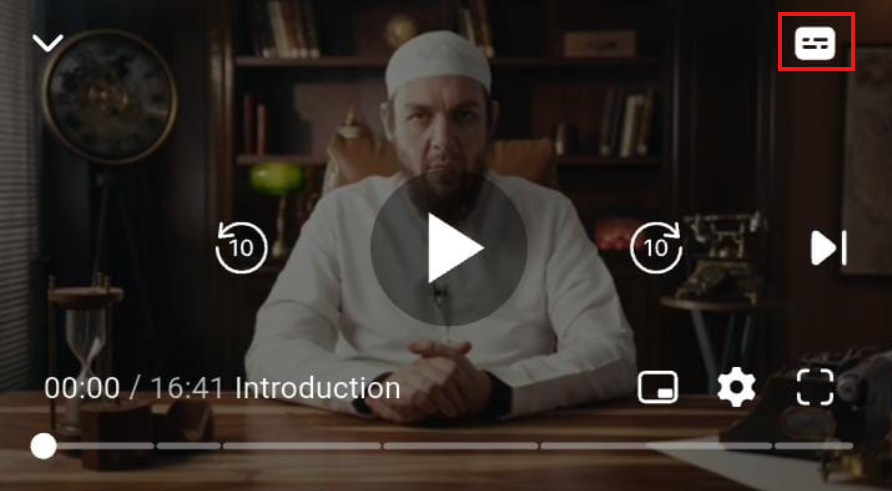
Tip: Subtitles may be turned off by default, so always check the subtitle setting first.
2. Refresh Your Browser or App
Sometimes subtitles fail to load due to temporary playback issues.
Web Browsers
• Refresh the page
• Clear browser cache and cookies
• Try a different browser (Chrome, Firefox, Safari, Edge)
Mobile App
• Close the AMAU app completely and reopen it
• Update the app to the latest version
• Restart your device if needed
Older app versions or unsupported browsers may prevent subtitles from displaying correctly.
3. Check Your Internet Connection
A slow or unstable internet connection may prevent subtitles from loading.
Recommended speeds:
• HD video: 18—35 Mbps
• SD video: 1—18 Mbps
You can test your connection at:
[https://fast.com]
If playback is slow, lowering the video quality may help subtitles load more reliably.
4. Advanced Troubleshooting
If subtitles still do not appear:
• Disable browser extensions that may interfere with playback
• Try using an incognito/private browser window
• Free up storage space on your device
• Restart your router to refresh your internet connection
5. Subtitle Errors or Inaccuracies
Some subtitle issues may not be technical. You may notice:
• Minor spelling or formatting mistakes
• Subtitles slightly out of sync with the video
• Incorrect references or translations
If you encounter such errors, please report them so they can be corrected.
6. Reporting Subtitle Issues
If subtitles are missing or contain errors, please contact AMAU Student Support.
Email: helpdesk@amauacademy.com
When reporting an issue, include:
• Your Student ID (if available)
• The video title
• The timestamp where the issue occurs
• Your device and browser/app
• Screenshots if possible
This helps our team investigate and resolve the issue more quickly.
7. A Note for Students
Subtitles are a helpful tool, but active listening and note-taking remain important for benefiting from lessons. If subtitles are temporarily unavailable, consider:
• Listening carefully and taking notes
• Reviewing lesson resources or references
• Asking questions in the AMAU Community
For any further queries please contact helpdesk@amauacademy.com